
Recently I’ve started to build a LMS(Learning management system) for one of my client. I assumed the hardest parts would be backend architecture, database management and subscription payment integration . But the real challenge hit me when I tried to deliver video lectures on demand.
My first attempt was straightforward: upload an MP4 file and stream it directly and see how it goes.
It worked… but only for me. For students, especially those with slower connections, playback was a nightmare:
Constant buffering.
Long load times before the video even started
Zero adaptability between mobile networks and Wi-Fi.
I quickly learned that MP4 is not streaming — it’s just a downloadable file pretending to stream. My next though was
“There must be a service for this.”
I came across services like MUX, Cloudflare Stream and Bunny.net which make streaming almost plug-and-play. I tried Mux, and it was smooth — great APIs, analytics, and quick setup.
But when I checked the pricing. For a small project, it was fine. But in production, with potentially thousands of students watching simultaneously, costs would skyrocket.
I needed something scalable, production-ready, and cost-efficient. That’s when I discovered the power of Adaptive Bitrate Streaming (ABR).
What is Adaptive Bitrate Streaming (ABR)?
ABR is the technology behind why YouTube, Netflix, and Amazon prime seem so smooth, even when your network speed changes. Instead of sending one giant MP4 file, ABR works like this:
Multiple Renditions : The same video is encoded at different qualities from
1080p @ 5000 kbpsto240p @ 600 kbpsthe quality which is suitable according to the user bandwidth speed is delivered.Segmentation: The video is chopped into tiny chunks (2–10 seconds long). Instead of downloading the whole file, the player fetches chunks one at a time
Adaptive Playback: The video player constantly monitors your bandwidth + CPU. If your internet slows down it automatically detects it and drops from
1080p → 480pseamlessly and if the connection is improved it climbs back up without buffering.Manifest File: An index file (
.m3u8for HLS or.mpdfor DASH) lists all available renditions. The player reads this to know what options it has.
Once I understood ABR, the next question was:
“How do I actually generate all these renditions, chunks, and manifests?”
That’s when I came across the ffmpeg
What is ffmpeg:
ffmpeg is a video processing open source command-line software project that serves as a comprehensive multimedia framework and can perform almost every video and multimedia manipulation from changing its compression to its container type to convert my raw MP4s into ABR-ready streams:
ffmpeg -i input.mp4 \
 -map 0:v:0 -map 0:a:0 \
 -map 0:v:0 -map 0:a:0 \
 -map 0:v:0 -map 0:a:0 \
 -c:v libx264 -crf 22 \
 -c:a aac -ar 48000 \
 \
 -filter:v:0 scale=w=480:h=360 -maxrate:v:0 600k -b:a:0 64k \
 -filter:v:1 scale=w=640:h=480 -maxrate:v:1 900k -b:a:1 128k \
 -filter:v:2 scale=w=1280:h=720 -maxrate:v:2 900k -b:a:2 128k \
 \
 -var_stream_map "v:0,a:0,name:360p v:1,a:1,name:480p v:2,a:2,name:720p" \
 -preset slow -hls_list_size 0 -threads 0 \
 -f hls -hls_playlist_type event -hls_time 3 -hls_flags independent_segments \
 -hls_segment_filename "%v/segment-%03d.ts" \
 -master_pl_name master.m3u8
This is the pipe line used my me on my LMS project in this. In this video is generated for parallel outputs of 360p, 480p, and 720p and breaks video into 3-second segments. Instead of buffering a huge MP4, users get lightweight .ts segments delivered via a CDN, controlled by the master.m3u8 playlist.
Scaling It Into a Video Processing Pipeline:
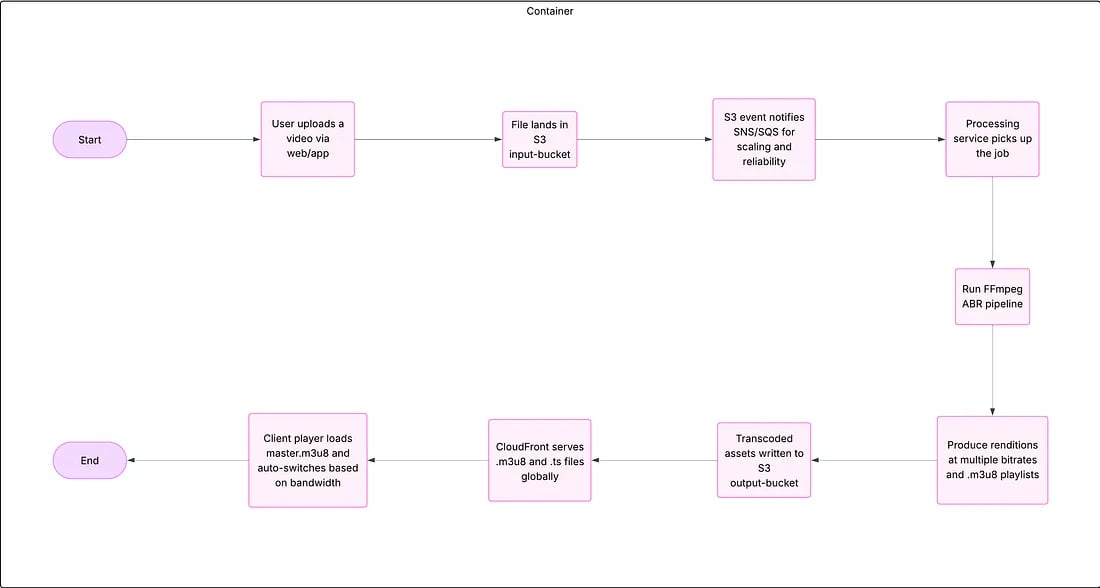
Running ffmpeg manually was fine for experiments, but for production I needed automation. That’s when I built a video processing pipeline:
Upload → Raw S3 Bucket: Instructor uploads video which is saved in an S3 input bucket.
Queue Trigger : A job is pushed into a queue (SQS / RabbitMQ) to signal processing.
Dockerized ffmpeg: A Docker container hosted on AWS polls the queue, pulls the raw video from S3, runs ffmpeg, and generates ABR outputs.
Processed S3 Bucket: Segments +
.m3u8manifest are stored in a separate output bucket.CloudFront CDN: CloudFront sits in front of the bucket, caching and delivering video chunks globally.
User Playback: Students get smooth, adaptive playback on any device.
 Key takeaways:
Looking back, this journey wasn’t just about getting videos to stream — it was about learning how to think differently about scale, performance, and cost.
When I first tried to stream MP4s directly, I thought it would “just work.” It didn’t. That failure was my first real lesson: not everything you can play locally is meant for the web at scale.
Discovering Adaptive Bitrate Streaming (ABR) felt like unlocking a secret door. Suddenly, it made sense why platforms like YouTube or Netflix never buffer the same way raw MP4 files do. It wasn’t magic — it was smart engineering.
Mux and other SaaS tools were like training wheels for me. They gave me quick wins and a working prototype. But when I looked at production-level traffic and costs, I knew I needed to build something of my own.
That’s where ffmpeg and AWS came in, and honestly, it felt empowering to piece it all together myself.
In the end, this project wasn’t just about building an LMS or streaming videos. It was about understanding the why behind every piece of the pipeline. And that’s a lesson I’ll carry into every project from here on